 2bcea9d582
* Initial scaffolding

* Applies MDM override

* Unit tests

* Helpers business logic

* Return error if trying to modify any config that is gated by MDM

* Add ManagedFields to returned config over GetConfig

* Adds initial 101 MDM policy business logic testing

* gRPC MDM changes

* MDM Name scoping for clarity

* Implements windows loading of MDM policy

* Adds missing WGPort config

* Cleanup setupKey to align to linear

* Align split tunnel code

* Adds some log

* Prefix every log with MDM

* Adds debug config cobra command

This can be useful for troubleshooting and checking config
now that its resolution is not trivial

defaults > config > env cars > CLI/UI > MDM

* Adds MDM 1m diff checker & reloader

* Adds also up/start after cancel

* Publishes event for UI to sync upon MDM changes

* Add events to resync UI to actual config

This also provide fixup for UI no aligning to changed config when coming from cli up with config flags.

* UI behavior conflicts relaxation

UI sends full config snapshot with all values. It doesn't
make sense to block it if the values are aligned with the
values constrained by the MDM policy. It's just simplier
to allow values that are compliant. (this goes for the CLI
as well at this point)

* Lock toggle Settngs

* Advanced Settings locking

* Fixup presharedkey

* Apply MDM locks

* Toggle gray in/out for Advanced Settings

* Adds support for disabling of Profiles and UpdateSettings feature flags

* Adds Gate Login as well when --disable-update-settings=true is given to service

This commit tries to settle things with an old PR-4237 which had relaxed
the case where the SetConfig returned an `Unavailable` code error.

Under this circumnstance the PR allowed the upFunc to just emit a warning and
progress further with the login gRPC. Since the login call is consuming
the --management-url coming from the `up` command, it might be possible
to abuse the "Unavailable" code to inject a management URL that is different
from the configured one even though the --disable-update-settings is set
to true (?)

* Evaluate disable-update-settings errors only when there's an actual override

* [UI] Fixup advanced Settings

* [UI] Fixup for preshared key

* [UI] Fixup for profile enable/disable toggle

We need to align the initial state to evaluate the delta in case.

The initial state has to be "true" since the profile starts visible.
Then we receive MDM and transition the cache bool value to the actual
MDM imposed state

* Enforces disable networks

* [UI] Aligns to "enable/disable once on change only"

* Fixup: MDM wins. always

* Removes --disable-advanced-settings

It was a typo in our meetings. the actual thing is --disable-update-settings

* [PROTO] Removes --disable-advanced-settings

* [UI] Removes --disable-advanced-settings

* Pins feat profile retrieval to notif event

* [UI] Fix for "hide" not working when propagating to parent with children

* Adds dep for reading plist files

* Introduces support for darwing plist loading

* Tests MDM config reload via ticker

* [PROVISIONING] ADMX/ADML/PS/bash scripts/templates

* CI fixes

- Add docstrings to `mdm_integration`
- refactor for cognitive complexity
- mod tidy

* Linting

* Add docstrings to `mdm_integration`

* nil,nil is no policy and no error. Allow it

* nil,nil is no policy and no error. Allow it

* exclude MDM profile adminstrated keys data from debug bundle

* Fixes Rosenpass left disable after MDM unlock

* Partial revert coderabbit added docstrings

* Renaming fix

* Avoid locking on clientRunning bool when the connection is aborted for whatever reason

We want to just signal this through the giveUpChan, we will manage the signal from
the waiter side and in case set it to false there. THis way we avoid locking,
which should allow the MDM down+wait_for_term_chan_signal_+up procedure

clientRunning is used to signal two different conditions here:

1. the initialization procedure is over (we have an engine)
2. the connection being up (or being attempted)

Probably these two functionalities should not alias, and the failure of the second condition
(because of any error) should just drive a reconnection (currently it's not happening,
and we silently go idle).
OR, mor probably, the two things are the SAME and there should not exist a case where
we did the "Up" initialization and connection attempt but we are not still attempting it.

* Moves test helper at te very bottom

* Addresses github comments

* No lock no copy

* Prevents engine not stopping within 10 secs from being paired by another instance

We instead juts SKIP updating the policy, so
1. the MDM ticker will kick in 1 minute time,
2. find the policy misaligned,
3. enter the onMDMPolicyChange,
4. find the s.clientRunning == true
   (because it is set to false only in server cleanupConnection,
   and not by s.actCancel())
5. call s.actCancel() again if not nil
6. immediately return from <-s.clientGiveUpChan
7. finally call s.restartEngineForMDMLocked()

* Since we ARE running there should be a config

If the config was cancelled midflight, connect will abort later on

* DisableAutoConnect should not stop a running connection.

DisableAutoConnect should just avoid the connection attempts *when the service starts*.
If we are started and we are up and running, DisableAutoConnect should not kick in.

Another PR will follow about this topic

* Removes unused vars

* Moves callback into Run method arg

* align comment to removal of DisableAutoConnect

DisableAutoConnect should just avoid the connection attempts *when the service starts*.
If we are started and we are up and running, DisableAutoConnect should not kick in

* Removes unused managed_fields data.

This was initially used to drive the UI but approach changed
to reload config/features upon notifications which makes this data redundant.

* Reorder stuff

* Unexport unrequired vars/functions

PoliciesEqual → policiesEqual
AllKeys → allKeys

* Adds list of MDM managed fields in the debug bundle





Start using NetBird at netbird.io
See Documentation
Join our Slack channel or our Community forum
🚀 We are hiring! Join us at careers.netbird.io
NetBird combines a configuration-free peer-to-peer private network and a centralized access control system in a single platform, making it easy to create secure private networks for your organization or home.
Connect. NetBird creates a WireGuard-based overlay network that automatically connects your machines over an encrypted tunnel, leaving behind the hassle of opening ports, complex firewall rules, VPN gateways, and so forth.
Secure. NetBird enables secure remote access by applying granular access policies while allowing you to manage them intuitively from a single place. Works universally on any infrastructure.
https://github.com/user-attachments/assets/10cec749-bb56-4ab3-97af-4e38850108d2
Self-host NetBird (video)

Key features
Quickstart with NetBird Cloud
- Download and install NetBird at https://app.netbird.io/install.
- Follow the steps to sign up with Google, Microsoft, GitHub or your email address.
- Check the NetBird admin UI.
Quickstart with self-hosted NetBird
This is the quickest way to try self-hosted NetBird. It should take around 5 minutes to get started if you already have a public domain and a VM. Follow the Advanced guide with a custom identity provider for installations with different IdPs.
Infrastructure requirements:
- A Linux VM with at least 1 CPU and 2 GB of memory.
- The VM should be publicly accessible on TCP ports 80 and 443 and UDP port 3478.
- A public domain name pointing to the VM.
Software requirements:
- Docker with the Compose plugin (Compose v2 or higher). See the Docker installation guide.
Steps
- Download and run the installation script:
export NETBIRD_DOMAIN=netbird.example.com; curl -fsSL https://github.com/netbirdio/netbird/releases/latest/download/getting-started.sh | bash
A bit on NetBird internals
- Every machine in the network runs the NetBird agent, which manages WireGuard.
- Every agent connects to the Management Service, which holds network state, manages peer IPs, and distributes updates to agents.
- Agents use ICE (via pion/ice) to discover connection candidates for peer-to-peer connections.
- Candidates are discovered with the help of STUN servers.
- Agents negotiate a connection through the Signal Service, exchanging end-to-end encrypted messages with candidates.
- When NAT traversal fails (e.g. mobile carrier-grade NAT) and a direct p2p connection isn't possible, the system falls back to a Relay Service and a secure WireGuard tunnel is established through it.
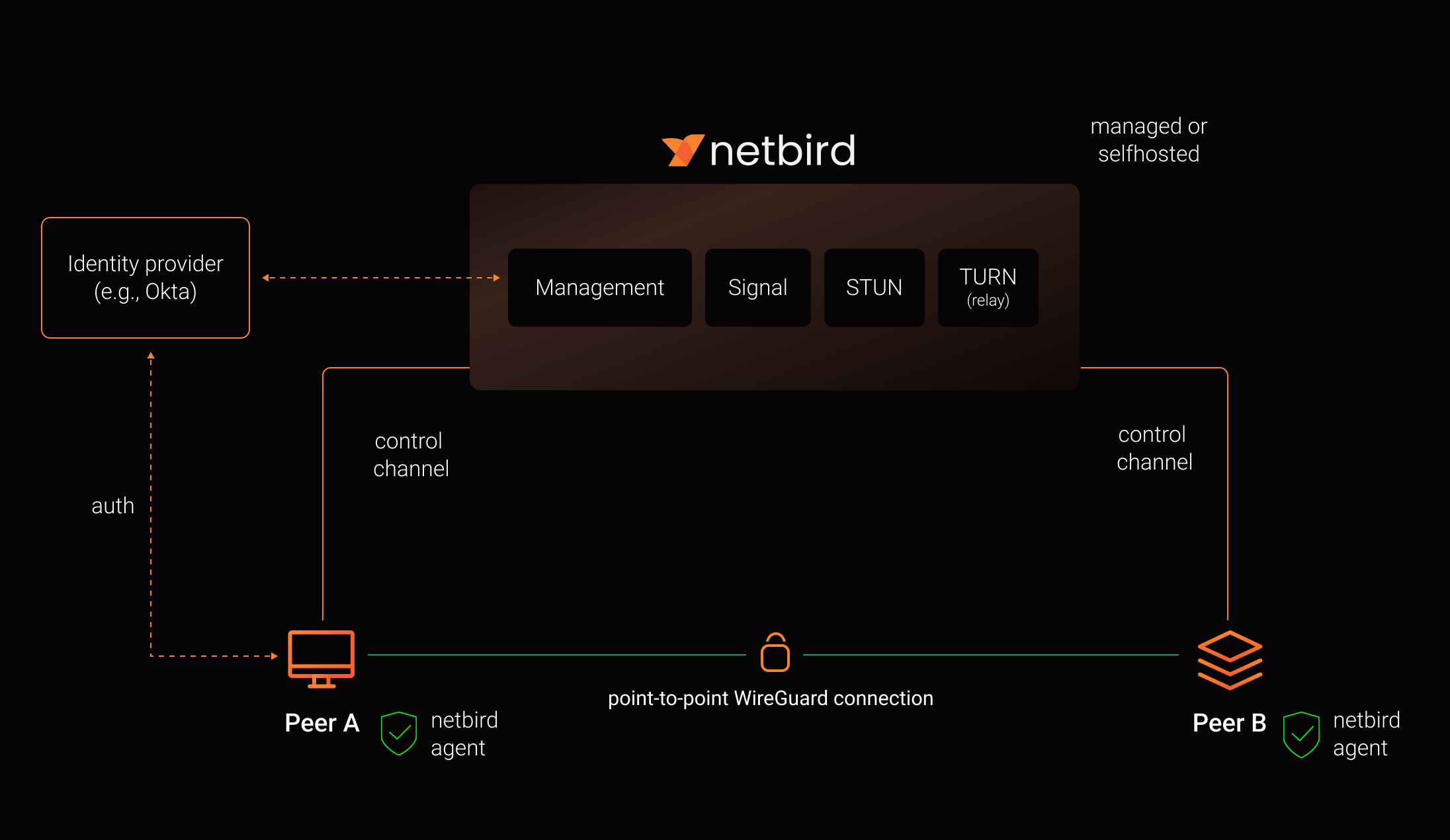
See a complete architecture overview for details.
Community projects
- NetBird installer script
- netbird-tui - terminal UI for managing NetBird peers, routes, and settings
- caddy-netbird - Caddy plugin that embeds a NetBird client for proxying HTTP and TCP/UDP traffic through NetBird networks
Note: The main branch may be in an unstable or even broken state during development.
For stable versions, see releases.
Support acknowledgement
In November 2022, NetBird joined the StartUpSecure program sponsored by the Federal Ministry of Education and Research of the Federal Republic of Germany. Together with the CISPA Helmholtz Center for Information Security, NetBird brings security best practices and simplicity to private networking.

Acknowledgements
We build on open-source technologies like WireGuard®, Pion ICE, and Rosenpass. We greatly appreciate the work these projects are doing, and we'd love it if you could support them too (e.g., by starring or contributing).
Legal
This repository is licensed under the BSD-3-Clause license, which applies to all parts of the repository except for the directories management/, signal/ and relay/. Those directories are licensed under the GNU Affero General Public License version 3.0 (AGPLv3). See the respective LICENSE files inside each directory.
WireGuard and the WireGuard logo are registered trademarks of Jason A. Donenfeld.